
Search Window Sticker
Table of Contents
Key Takeaways
- Start with the VIN to identify your Buick’s model, year, and basic configuration.
- Check RPO codes and factory paperwork to confirm the exact trim and original equipment.
- Don’t trust badges alone. Compare the VIN, factory data, and actual vehicle features to verify the trim.
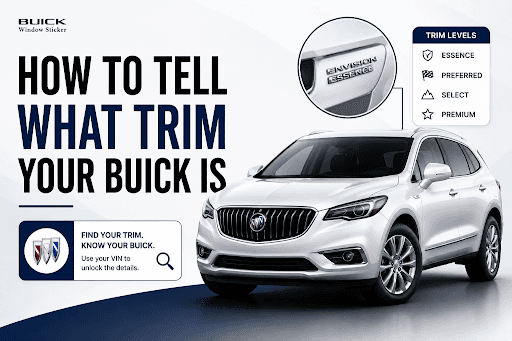
Your Buick's trim is more than a badge on the liftgate or fender. It can determine the interior materials, wheels, safety technology, engine, drivetrain, convenience features, and other equipment that came with the vehicle.
If you’re looking for a Buick’s trim, the easiest place to start is your VIN and a Buick VIN Decoder. From there, you can compare the VIN information with factory RPO codes, the vehicle's equipment, badges, and original paperwork.
This is especially helpful when you're buying a used Buick, ordering parts, selling a vehicle, or trying to verify a classic model.
What Does Buick Trim Mean?
A Buick trim level is a particular version of a Buick model with its own combination of standard equipment, features, styling, and available options. For example, current Buick SUVs can be offered in trims such as Preferred, Sport Touring, and Avenir, although the names and available trims vary by model year and vehicle.
It's also important to separate the trim from a package or individual option. A Buick can have one trim level and still have additional factory packages or options. For example, two Buicks with the same trim may have different wheels, technology, safety equipment, or other factory-installed features.
Term | What It Means | Example |
Model | The Buick vehicle line | Enclave, Envision, Regal, Riviera |
Trim level | A group of features sold together | Sport Touring or Driver Confidence package |
Factory option | An individual factory-installed feature | Sunroof, upgraded audio, heated seats |
Performance designation | A performance-focused Buick version | GS, Gran Sport, T-Type |
Dealer accessory | Equipment added after factory production | Accessory wheels or splash guards |
A trim name alone is not enough. Factory options and packages can make two Buicks with the same trim different from one another.
1. Find Your Buick's VIN
The VIN is the best starting point because it identifies the individual vehicle. Buick recommends using the VIN when identifying the correct parts and accessories for a specific vehicle. The VIN can be found on the vehicle, registration, insurance documents, and other paperwork.
Where to Find the Buick VIN?
You can usually find your Buick's VIN in any one of these places:
 Lower driver's side corner of the dashboard
- Driver's side door jamb
- Driver's side B-pillar label
- Vehicle title
- Registration
- Insurance documents
- Service and maintenance paperwork
- Original window sticker or dealer paperwork
Older Buicks can have VIN formats and identification locations that differ from modern vehicles, so classic-car owners may also need to check the body tag, VIN plate, frame markings, or other model-specific identification points.
Check the VIN before using it
Before running a lookup, compare the VIN shown on the vehicle with the number on the title and registration. The numbers should match.
If they don't, stop and investigate the discrepancy before buying the Buick or spending money on restoration work.
What Can a Buick VIN Tell You?
A VIN can provide important information about the vehicle's identity and configuration. The exact information available depends on the model year and the database used. Here’s what you can find with the VIN:
VIN Information | How It Helps |
Manufacturer | Confirms the vehicle's production identity |
Model year | Helps identify the correct trim and equipment for that year |
Vehicle line | Identifies the Buick model family |
Body style | Helps distinguish different body configurations |
Engine | Can help separate different powertrain configurations |
Assembly plant | Useful for documentation and collector research |
Production sequence | Helps identify the individual vehicle |
A VIN should not be treated as a complete factory equipment list. Some decoders may identify a trim or series, but they may not display every package and option in plain English.
2. Use a Buick VIN Decoder
Once you have the VIN, you can use a Buick VIN decoder to get more information about the vehicle. With BuickWindowSticker.com, you can decode the VIN for free to see any Buick’s trim. The steps to follow are:
- 1
Enter Your Buick VIN
Enter the complete VIN into the Buick VIN decoder. Check each character carefully before submitting it. - 2
Confirm the Basic Vehicle Information
Look at the model year, Buick model, body style, engine, and other core information returned by the decoder. - 3
Look for Trim Information
The VIN decoder will provide a trim name, series designation, or other trim-related information. - 4
Compare the Results
Compare the decoder results with the Buick's badges, wheels, interior, equipment, and original paperwork. - 5
Verify With Factory Data
If the results are unclear, check the Buick's RPO codes, build sheet, window sticker, or other factory documentation.
Note that different databases can describe the same Buick differently. One source may use a marketing trim name, while another may show an internal series or configuration code. Factory documentation can provide stronger confirmation when the results don't agree.
3. Find the Buick RPO Codes
If you want to get more specific, look for your Buick's RPO codes.
RPO stands for Regular Production Option. GM uses these codes to identify factory-installed equipment and configurations. GM's own heritage materials document RPO codes alongside vehicle build information, specifications, VIN decoding, and Service Parts Identification labels.
RPO codes can identify details such as:
- Engine
- Transmission
- Exterior paint
- Interior trim
- Wheels
- Suspension
- Audio equipment
- Safety equipment
- Technology
- Factory packages
- Other production options
Where Are Buick RPO Codes Located?
The location depends on the Buick and model year. Look in places such as:
- Glove compartment
- Trunk area
- Trunk floor
- Spare-tire area
- Rear cargo area
- Driver-side body panel
- Service Parts Identification label
- Original build documents
GM documentation confirms that RPO information can appear on a Service Parts Identification label installed in the vehicle during production.
Check for a QR Code
Some newer GM vehicles use QR codes on vehicle identification labels. If your Buick has one, scanning it may provide additional vehicle-specific information that can help you compare the factory configuration with the equipment on the vehicle.
How RPO Codes Help Identify Trim?
There isn't always one universal RPO code that simply spells out the Buick's trim. Instead, the complete factory configuration can be represented by several codes.
You may find codes related to:
- Interior trim
- Exterior paint
- Wheels
- Suspension
- Powertrain
- Safety equipment
- Technology packages
- Appearance packages
That's why checking the combination of factory codes can be more useful than looking for one code that says "Avenir," "GS," or "Limited."
4. Check the Exterior and Interior Features
Physical features can give you useful clues about your Buick's trim. They should be treated as supporting evidence rather than final proof.
Exterior Clues
Look at:
- Liftgate or trunk badging
- Fender emblems
- Grille design
- Wheel design and size
- Roof rails
- Sunroof or panoramic roof
- Spoiler
- Headlights and taillights
- Bumper design
- Exhaust configuration
- Brake and tire setup
- Exterior paint
- Appearance-package details
Interior Clues
The cabin can provide even more clues. Check for:
- Cloth, leatherette, leather, or specialty upholstery
- Seat design
- Heated or ventilated seats
- Power seat controls
- Memory seating
- Steering wheel design
- Instrument cluster
- Infotainment screen
- Audio system
- Navigation
- Head-up display
- Camera system
- Rear-seat entertainment
- Interior trim materials
- Climate-control equipment
- Driver-assistance controls
Buick notes that safety and driver-assistance equipment can vary based on the vehicle's trim and model, so checking the actual configuration can be important when comparing features.
A badge alone isn't enough. Badges can be removed, replaced, or added later. Wheels, seats, spoilers, grilles, and other parts can also be changed after the vehicle leaves the factory.
Match Your Buick to the Correct Model Year
This is one of the most important steps.
Buick has used different trim names, packages, and equipment across different years. A trim name that existed on one Buick may not have been available on another model or model year.
For example, Buick currently uses Preferred, Sport Touring, and Avenir across its current SUV lineup, but the exact availability and equipment vary by model.
Modern Buick Trims
Depending on the model year and vehicle, you may come across names such as:
- Preferred
- Sport Touring
- Essence
- Premium
- Premium II
- Avenir
Always check the trim against the correct model year instead of assuming the same trim names and equipment applied across the entire Buick lineup.
Classic Buick Trims and Series
Older Buicks used different naming systems and series designations. Depending on the era, you may encounter names such as:
- Special
- Skylark
- LeSabre
- Electra
- Century
- Regal
- Riviera
- Limited
- Estate Wagon
- Sportwagon
- Gran Sport
- GS
- T-Type
- Grand National
- Reatta
Classic Buick identification can require more than a modern VIN lookup. Body tags, trim tags, production records, RPO information, invoices, and other historical documentation can all help establish the original configuration.
GM's Heritage Center maintains historical vehicle literature, build sheets, dealer invoices, specifications, RPO and engine codes, VIN decoding information, and identification labels.
How to Tell if Your Buick Is an Avenir
Avenir is Buick's premium trim designation on several current models. Buick describes Avenir as its highest-end trim and currently offers it on models including the Envista, Encore GX, Envision, and Enclave.
If you're trying to determine if a Buick is a genuine factory Avenir, don't rely only on the badge.
Check:
- Avenir badging
- Grille design
- Wheel design
- Interior materials
- Seat design
- Factory equipment
- RPO or build information
- Original window sticker
- VIN-specific factory data
For example, current Buick Avenir models can have distinctive equipment such as perforated leather-appointed seating, unique wheels, and other model-specific features.
An Avenir badge added by a previous owner does not turn a lower trim into an Avenir. The factory configuration is what matters.
Confirm Your Buick With Factory Paperwork
If you need strong evidence of a Buick's original trim, compare several sources instead of relying on one clue.
Evidence | Best Use | Trim Verification |
Original window sticker | Original trim, equipment, options, MSRP | Very high when VIN-matched |
Dealer invoice | Original order and equipment | Very high when VIN-matched |
Factory build sheet | As-built factory configuration | Very high when matched |
RPO/SPID label | Factory production codes | High when original |
VIN decoder | Vehicle identity and basic configuration | Moderate |
Brochures/spec sheets | Explaining trim equipment | High for reference |
Badges/features | Initial visual identification | Low to moderate |
Seller description | Starting point | Low without documentation |
An original window sticker can be particularly useful because it shows the vehicle as it was configured for sale, while a build sheet or factory data can provide more information about the vehicle's production configuration.
What If Your Buick Trim Results Don't Match?
It isn't unusual to find conflicting information online. One website might call a Buick an Essence, while another gives a series or internal configuration name.
If that happens:
- 1.Check every VIN character again.
- 2.Confirm the VIN on the vehicle matches the title and registration.
- 3.Make sure you're using the correct model year.
- 4.Compare results from another VIN decoder.
- 5.Find the RPO or Service Parts Identification label.
- 6.Check for an original build sheet or window sticker.
- 7.Determine if the feature was factory-installed or added later.
- 8.Compare the vehicle with the correct model-year Buick specifications.
- 9.Contact a Buick dealer for newer-vehicle information.
- 10.For classic Buicks, consult a marque specialist or experienced appraiser.
Why Knowing Your Buick Trim Matters?
Identifying the correct trim isn't just about knowing the name attached to your Buick. It can help with several practical decisions.
Order the Right Parts
Some parts vary by trim, engine, suspension, wheels, or other equipment. Buick itself recommends using the VIN when identifying the correct parts and accessories for a specific vehicle.
Verify a Used Buick
A trim lookup can help you compare the vehicle you're viewing with the seller's description.
Check Factory Equipment
Find out which features were originally installed instead of guessing based on the vehicle's current appearance.
Support a Restoration
Classic Buick owners can use factory information to guide paint, trim, drivetrain, wheels, and equipment decisions.
Improve a Vehicle Listing
Sellers and dealers can provide more accurate descriptions when they know the vehicle's original trim and equipment.
Support Collector Research
For rare Buicks, factory documentation can help establish what the vehicle was originally built as.
Find Your Buick's Exact Trim and Factory Configuration
If you're unsure which Buick trim you have, don't rely on a badge or a seller's description alone. Start with the VIN, then compare the results with factory options, RPO codes, equipment, and original documentation.
Enter your Buick VIN to check the model, trim, factory equipment, and other available vehicle details.